Covid-19

Latest Research on Covid-19

Latest Articles
Latest Research

Table of Contents (TOC) Alerts by RSS or Email.

Any individual is able to set up an RSS or email alert when a new Table of Contents for a particular publication within the ACM Digital Library is made available. To do so a person must have an ACM Web AccountACM Web Accounts are free and easy to set up. To create a Web Account click on the ‘SIGN UP’ link which can be found on the upper right handle corner of any page within the Digital Library.

APA PsycArticles

Simply click the link and login with your MyAPA user id and password. Then simply scroll down to the Research Alert section and select any or all from the preselected list or select Create a Custom Alert at the bottom and enter one or more keywords following the instructions on the screen. 

The alerts deliver a subset of the PsycARTICLES® and PsycBOOKS® databases on a particular topic and contain links to journal article and book chapter records. APA PsycNET® subscribers can navigate directly to the full text. Nonsubscribers can purchase individual articles or chapters. Alerts are sent in separate emails each Monday starting late in the day. You will only receive alerts if something new has been published on the topic(s) you have selected. 

And while you are in the email preference area, why not now tailor your email publications and messages from APA?  You can select the types and topics of broadcast emails, electronic newsletters, magazines and news by checking the boxes next to your choices and then clicking on Save All Updates at the bottom of the page.

Newsletters you can choose to receive are: 

  • APA Access (all-member newsletter to keep you up to date with APA activities and services).

  • APA Aging Issues.

  • APA Science Policy News.

  • Campus Representative Bulletin (for graduate students only).

  • Communiqué.

  • CYF News.

  • The Educator.

  • Good Company.

  • In the Public Interest.

  • PracticeUpdate (Practice Special Assessment paid or Lifetime Practice Members only).

  • Psychological Science Agenda.

  • Psychology and AIDS Exchange.

  • Psychology Giving, newsletter of the American Psychological Foundation.

  • Psychology International.

  • Psychology Teacher Network.

  • PsycINFO News.

  • The SES Indicator.

  • Spotlight on Disability Newsletter.

  • Women’s Psych-E.

Magazines and news you can select are: 

    • APA press releases.

    • Publications updates (news from APA’s Publications and Databases Office).

    • Monitor highlights.

    • gradPSYCH highlights.

By subscribing to TOC alerts for selected book series and journals, users will receive an email alert with the table of contents when a new journal issue or book series issue is published, meaning you can keep up to date with the latest content in your subject area without having to search or browse every time. 

To subscribe to the TOC alerts service you must have a profile on Emerald Insight. 

  • New users will need to register a profileThis can be done at the point of subscribing to the alerts.
  • If you already have a profile on  Emerald Insight then you do not need to register again. 
  • If you had a profile on the old platform, this was migrated over when we launched the new platform last year. If you have not yet activated your profile on  Emerald Insight please go to emerald.com/login and follow the ‘forgot your password’ option to set a new password and re-activate your profile. Please also see the additional note re previous alert subscriptions, below.

To subscribe, simply locate the journal of choice through our Publication Sitemap and click on the ‘subscribe link’. If this link is not visible under the title’s homepage then the alert service is not available for this title.


If you already have a profile or are not currently signed in, you will be prompted to log in at this point and all your alert subscriptions will be visible in your profile account. You will then be able to manage/unsubscribe from any alerts via your profile area.

Click on the ‘Alerts’ button provided on the top navigation bar and register by giving your name & email_id. After registration, please select the journals for which you are interested in getting alerts and save the profile. Upon saving your profile, you will get regular alerts.

Search Alerts in JSTOR

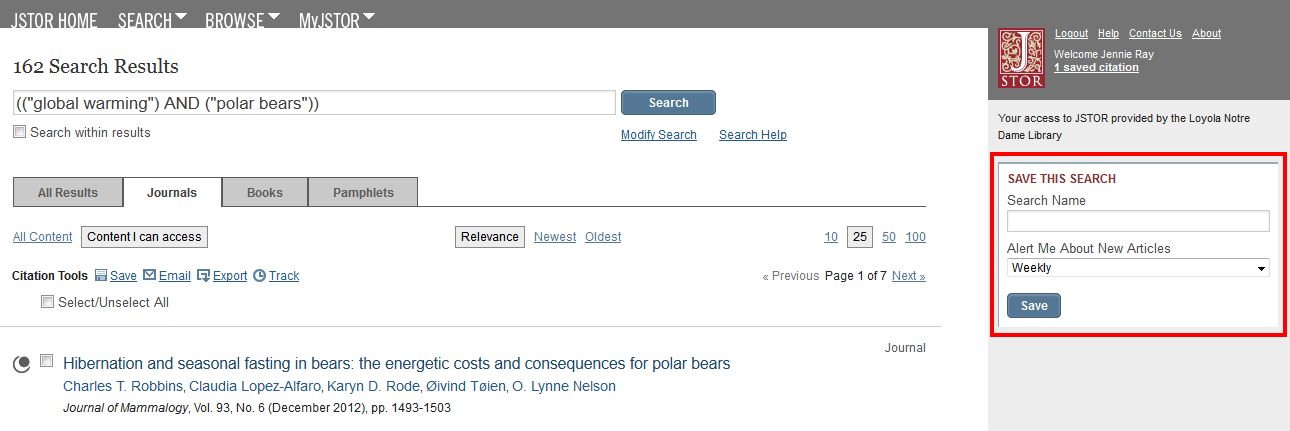
To create a search alert in JSTOR, log into your MyJSTOR account (see above). Then:

1. Conduct a search

2. In the Save This Search box on the right side of the screen, name the search and select how often you’d like to receive an alert about the search. Then click Save.
Journal/Table of Contents Alerts in JSTOR

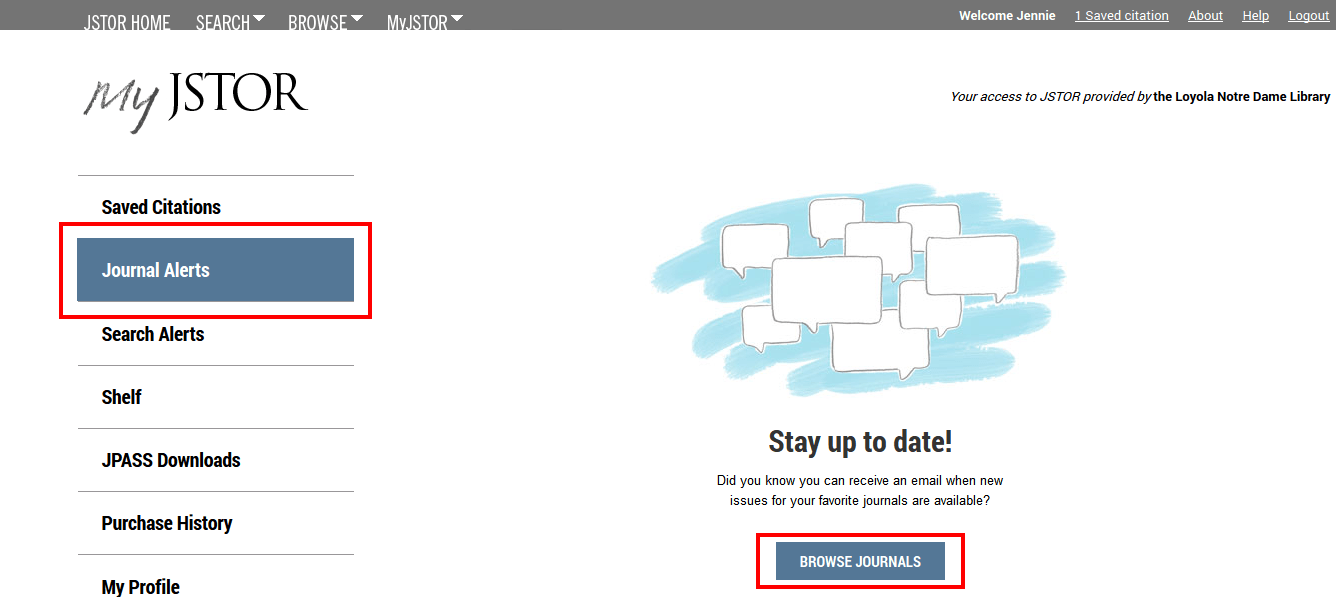
To create a journal (table of contents) alert in JSTOR, log into your MyJSTOR account. This will bring you to your MyJSTOR profile page. Next:

1. Click the Journal Alerts button in the left sidebar.

2. Click Browse Journals.
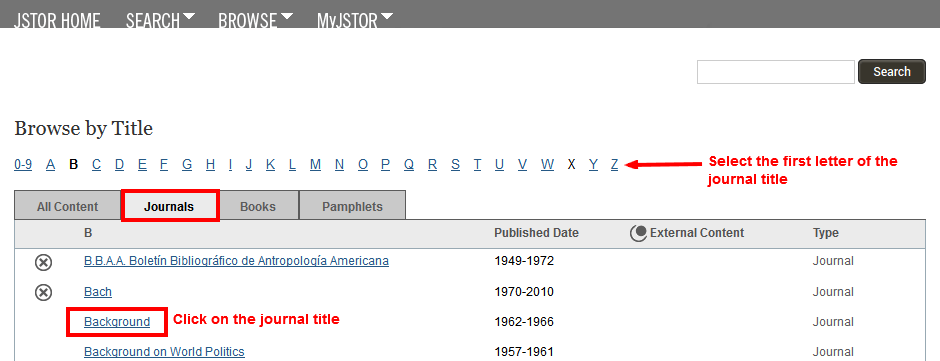
3. Select the Journals tab.

4. Click on the first letter of the journal title.

5. Click the journal title when the list appears.
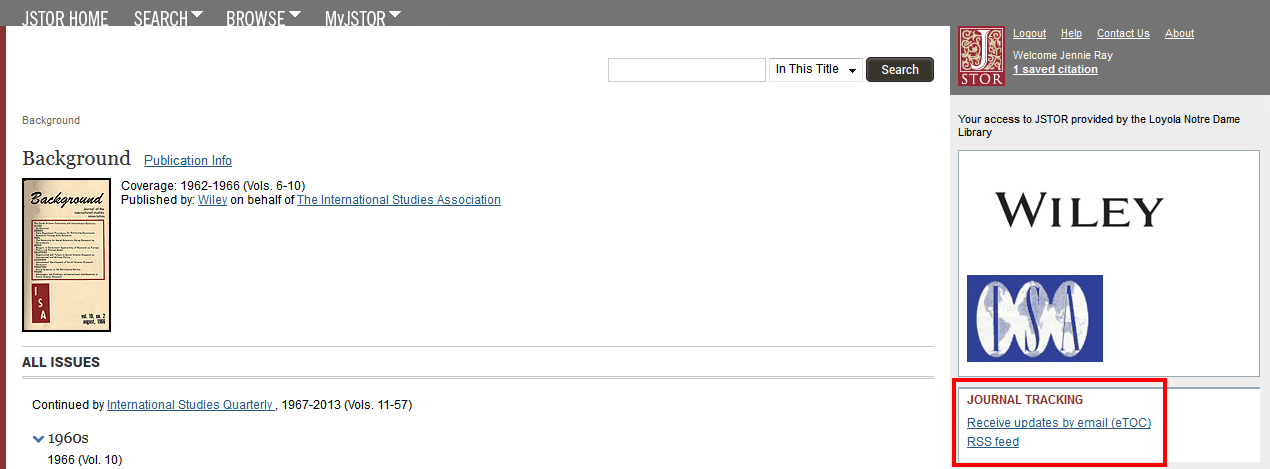
6. Click Receive updates by email (eTOC) in the Journal Tracking section at the bottom of the right sidebar.
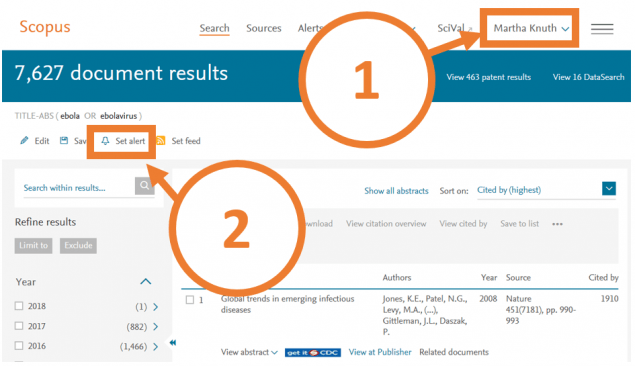
  1. Login to your Scopus account.
  2. After performing your search, click on Set Alert.
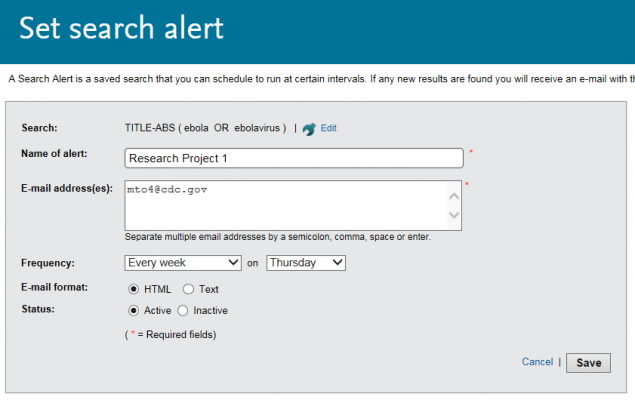
  3. Name your saved search and set your preferences for how often you would like to be updated and in what format. You can choose to be updated monthly or weekly.  Click Save at the bottom of the page.
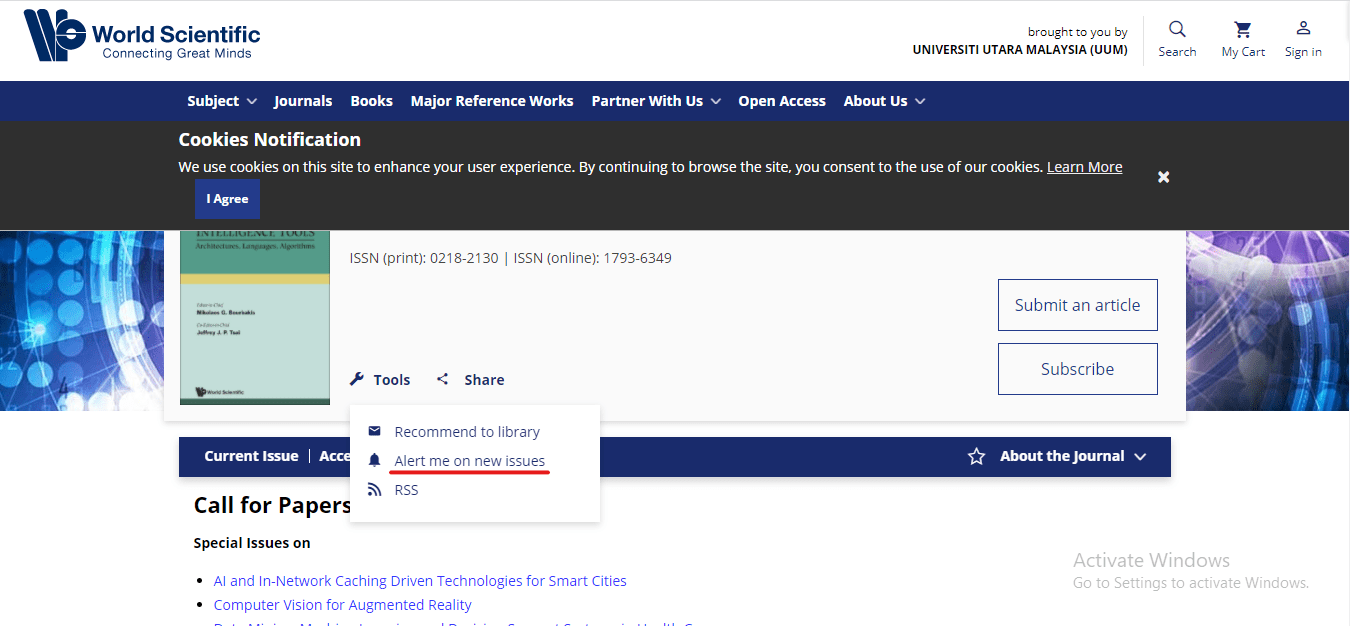
  1. Login to your World Scientific Computer Science Journals account.
  2. After performing your search, click on Tools
  3. Select Alert me on new issues.

Reference

RCSI Library. (2021). Coronavirus – COVID-19 Information Resourceshttps://libguides.rcsi.ie/covid19/latestresearch