
There are common search techniques that you can apply to almost any database, including article databases, online catalogues and popular search engines like Google. The techniques described in this guide will help you find relevant results when using LibSearch, Discover!, databases or other online resources.
This section describes some important methods you can use to search efficiently and effectively. It gives you guidance on:
What to look for
Records in library databases are comprised of fields containing specific pieces of bibliographic information. Common fields include:

The record below shows the field names on the left: Author, Title, Source, Standard No., Details, Language, Abstract, Descriptor

What to look for
Truncation, also called stemming, is a technique that broadens your search to include various word endings and spellings.
Similar to truncation, wildcards substitute a symbol for one letter of a word.
Identify your keywords in your assignment or related to your topic.
Before you start searching for information, spend time analysing the question to identify subject words and instruction words.
Do not enter assignment question, very long phrases or sentences into databases. These confuse databases and you will not get accurate results. Pick out the words that indicate the main points of your topic.
Subject words or keywords are the main ideas or concepts in your topic you will use when searching library catalogue, Discover! or specific databases.
Instruction (action) words tell you how to answer the question and what your essay should do. It is important that you understand exactly what these words mean so that you don’t misinterpret a question.
Examples of terms describing actions you may be asked to undertake in your assessment tasks: analyse, compare, comment, define, describe, discuss, evaluate, explain etc.
What to look for
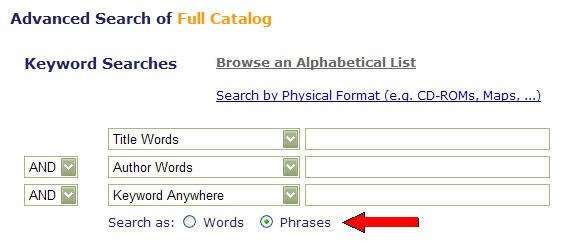
Most databases allow you to specify that adjacent words be searched as phrases.
Proximity operators also vary by database, but some common ones include:
w# = with
n# = near
What to look for
Stop words are frequently occurring, insignificant words that appear in a database record, article or web page.
Common stop words include:
a, an, the, in, of, on, are, be, if, into, which
Why should you care about stop words?
How can you avoid using stop words in your search?
Choose the most significant words that describe your topic and connect them together using Boolean operators or proximity operators.
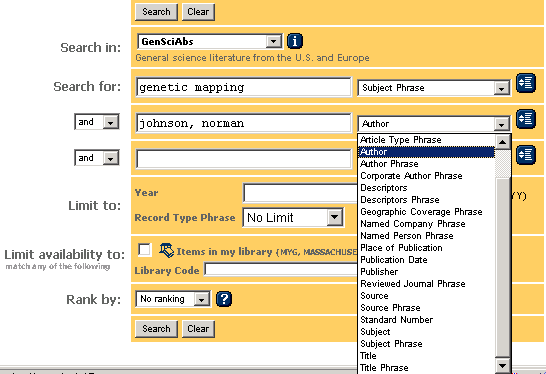
Search for your terms in specific fields, such as author, title or subject/descriptor.
What to look for
To find subject headings for your topic:
Another way to find subject headings:
Subject headings describe the content of each item in a database. Use these headings to find relevant items on the same topic. Searching by subject headings (a.k.a. descriptors) is the most precise way to search article databases.
It is not easy to guess which subject headings are used in a given database. For example, the phone book’s Yellow Pages use subject headings. If you look for “Movie Theatres” you will find nothing, as they are listed under the subject heading “Theatres – Movies.”
Keyword searching is how you typically search web search engines. Think of important words or phrases and type them in to get results.
Here are some key points about each type of search:
| Keywords | vs | Subjects |
| Natural language words describing your topic – good to start with | Pre-defined “controlled vocabulary” words used to describe the content of each item (book, journal article) in a database | |
| More flexible to search by – can combine together in many ways | Less flexible to search by – need to know the exact controlled vocabulary term | |
| The database looks for keywords anywhere in the record – not necessarily connected together | The database looks for subjects only in the subject heading or descriptor field, where the most relevant words appear | |
| May yield too many or too few results | iI too many results – also use subheadings to focus on one aspect of the broader subject | |
| May yield many irrelevant results | Results usually very relevant to the topic |
Try to include synonyms in your search. Databases only bring back results which contain the exact words you typed in, so if you include alternative keywords you may find a lot more relevant material.
TIP: Ask yourself “What other words could be used to describe this concept?”
For example, if you are researching a social services related topic take a moment to write down as many synonyms as you can think of – such as community service, social welfare, support services, social care/work etc.
Boolean operators form the basis of mathematical sets and database logic.
Why use Boolean operators?
Use AND in a search to:
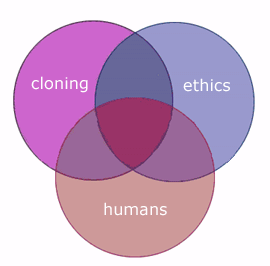
The purple triangle in the middle of the Venn diagram below represents the result set for this search. It is a small set using AND, the combination of all three search words.
Be aware: In many, but not all, databases, the AND is implied.
Use OR in a search to:
All three circles represent the result set for this search. It is a big set because any of those words are valid using the OR operator.
Use NOT in a search to:
Databases follow commands you type in and return results based on those commands. Be aware of the logical order in which words are connected when using Boolean operators:
Examples: